


Weather - By Xiaomi
4.12.95K Reviews
App Specs
- Version
- G-13.0.2.1
- Updated On
- License
- Free
- Downloads
- 1,000,000,000+
- Developer
- Xiaomi Inc.
- Categories
- Weather
- Platform
- Android
Screenshots
 Analysis by AppCompare
When I choose a weather app, I want a quick answer without handing over more access than the task requires. Weather - By Xiaomi sits in a familiar place on many phones: it is a free weather app from Xiaomi Inc., with a 4.1 average from around 1.3 million ratings and more than a billion installs. That scale makes it easy to find, but popularity is not the same as a guarantee that a forecast will suit every location or every plan. I treat it as a convenient everyday guide, then use judgement when the consequences of getting the weather wrong are serious.
What trust looks like in everyday use
The useful question is not whether a weather app sounds trustworthy in the abstract, but what you can see and control while using it. With this app, the practical starting point is to review its access through your phone’s own settings and decide whether location access fits the way you want to check forecasts. If you prefer not to share your live location, choosing a city manually is a sensible way to keep a forecast useful without making automatic location the default for your routine.
I would also separate a forecast from a safety decision. A weather screen can help me decide whether to bring a coat or shift a walk, but I would not rely on one app alone for a high-stakes warning or a rapidly changing local situation. That is not a knock against Xiaomi’s app; it is a healthy limit for any general-purpose forecast. For a long drive, outdoor work, or a day on the water, I would compare conditions with a dedicated local warning source as well.
Guides and Analysis on Weather - By Xiaomi
Make the location choice deliberately
Location is the most personal part of a weather workflow because it can make the first screen more convenient while also revealing where you are. If I only need the outlook for home, I can keep the app focused on that city rather than treating automatic detection as essential. If I travel, adding destinations I care about can be more practical than repeatedly checking wherever my phone happens to be. The right choice depends on whether convenience or a narrower location footprint matters more to you.
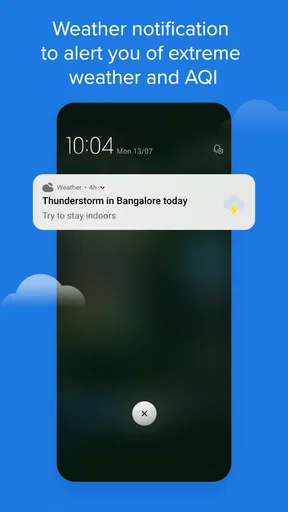
Before enabling alerts, I would check which kinds of notifications I actually want and whether they are useful enough to interrupt me. A warning that matters during a commute may be noise when I am nowhere near the affected area. Keeping notifications selective makes them easier to take seriously. I would also revisit the phone’s app permissions after changing how I use the app, rather than assuming the original setup still matches my preferences.
First Impressions and Interface
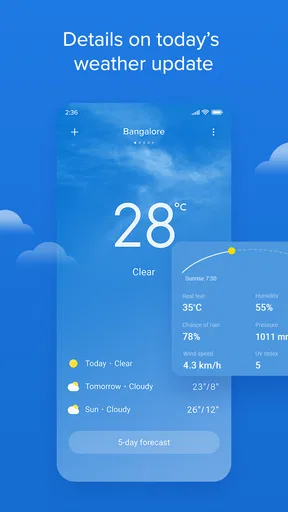
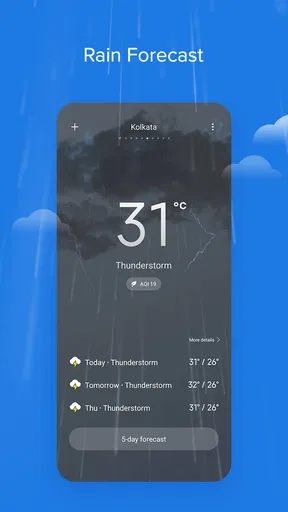
The moment I fired up Weather - By Xiaomi, the sleek and minimalist design caught my eye. It’s super easy to navigate, which is a big plus. No one wants to fumble around trying to find out if they need a raincoat or not. The interface is pretty intuitive, with a neat layout that gives you all you need at a glance.
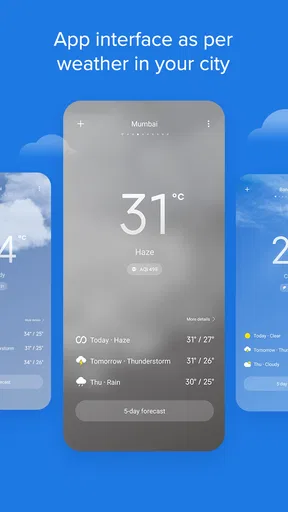
There’s a main screen with your current location’s weather, and it’s got these cute little animations that change based on the weather condition. It’s small touches like these that make using the app a bit more fun. You can swipe to see forecasts for the next few days, and everything loads up pretty swiftly.
Worth Reading Before You Choose

Basketball Stars: Multiplayer Is Fast, but Can It Recover When Matches Go Wrong?

WEBTOON Turns Phone Updates Into a Better Reading Routine

Link to Windows Runs on Shared Habits, Not Social Feeds

How Alibaba.com Dominates the B2B Marketplace

Metro's Quiet Rise: Redefining Mobile Communication

Harnessing Ecosystem Power with Phone Tracker by Number
Features That Stand Out
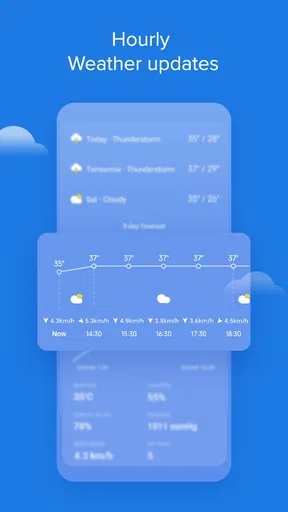
Now, let’s talk features. This app isn’t just about telling you if it’s sunny or not. It’s packed with a bunch of handy features. First up, the hourly forecast. This is super helpful if you’re planning your day and need to know when a downpour might hit. The accuracy here is pretty spot on from my experience.
Another cool feature is the severe weather alerts. It gives you a heads up if there’s something crazy happening weather-wise. It’s like having a little meteorologist in your pocket. And for those who like to geek out on details, there are neat extras like wind speed, humidity levels, and UV index. Perfect for planning that beach day!
Using the forecast rather than just glancing at it
The hourly view is most valuable when I use it to make a specific decision instead of scanning it as a row of numbers. For example, if I have a walk and errands planned, I check the rain timing before leaving, then look again before the return trip. A forecast several hours out is a planning aid, not a promise; if the sky is already changing, I give more weight to the latest conditions than to an earlier glance.
There is a similar trade-off with extra measurements. Wind, humidity, and UV can make a simple “nice day” forecast more actionable: wind can affect a bike ride, humidity can change how a warm afternoon feels, and UV is relevant when I will be outside for a while. I would not treat any single reading as a complete safety assessment, though. The point is to combine those details with the activity, clothing, and local conditions rather than letting a clean display create false certainty.
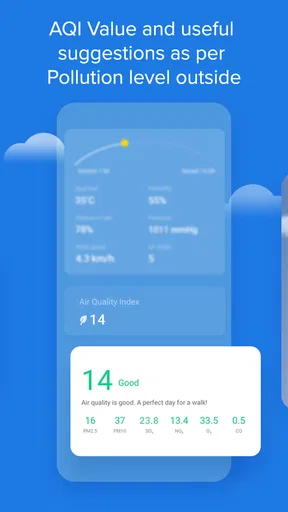
Air quality is another reason this app may be useful beyond deciding what to wear. If I am planning outdoor exercise, the AQI gives me a reason to pause and consider whether an indoor option makes more sense. It is a city-level clue, not a substitute for understanding conditions along a particular route. Someone with a health concern may want a source tailored to local air-quality advisories, especially when conditions are changing quickly.
Customization and Personal Touch
One thing I love is how you can customize the app to suit your needs. You can set notifications for certain weather conditions and even choose which stats you want to see on your home screen. This makes it feel very personal and tailored to you.
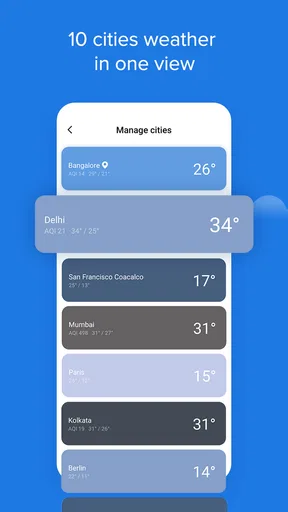
Plus, the app supports multiple locations. This is great if you travel a lot or just want to keep tabs on different places. Switching between locations is a breeze, and you don’t have to deal with any lag.
A practical routine for home, work, and travel
Multiple locations are most helpful when they represent places I genuinely need to compare: home, work, and perhaps a destination I am about to visit. I would keep that list intentional rather than adding cities I rarely check. Before a trip, comparing the destination with home helps me pack for the difference; during the trip, I can focus on the place I am actually visiting instead of relying on a forecast for my usual area.
For a realistic weekday example, imagine leaving home in the morning, commuting, then walking back after work. I would check the hourly forecast before setting out, look at wind or rain when choosing what to carry, and check again before the return journey if the weather seems unsettled. If I have selected alerts, they can provide another prompt, but I would not assume that a notification replaces checking the forecast directly or noticing what is happening outside.
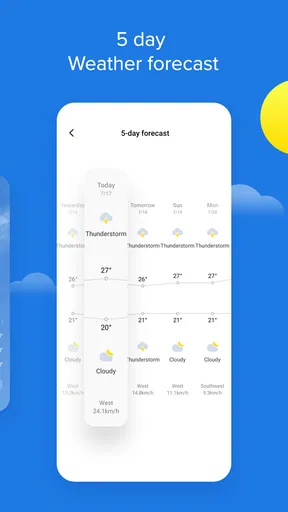
That routine also helps answer a common question: is the app better for a quick glance or for planning? I find it useful for both, but the glance is where its straightforward screen has the clearest advantage. For planning, the hourly and multi-day views are more useful when I revisit them as the day approaches. For a week-long outdoor itinerary, I would treat early forecasts as tentative and keep a second source available for decisions that cannot easily be changed.
Performance and Usability
Performance-wise, Weather - By Xiaomi runs smoothly. I didn’t encounter any crashes or bugs, which is a win in my book. It’s lightweight too, so it doesn’t hog your phone’s resources. Battery consumption is minimal, so no worries about it draining your phone on those long days out.
The app supports both Android and iOS, and it’s free to download. However, you might encounter some ads. They’re not too intrusive, but it’s something to keep in mind. There’s no option to remove them with a paid version, which might be a bummer for some.
Where it fits among weather apps
Compared with the usual alternatives, Xiaomi’s main appeal is a direct, everyday forecast with useful details in one place. A minimalist weather app may feel calmer if all you want is the current temperature, while a specialist forecasting service can be a better fit when you need richer maps, more technical tools, or a particular local alert system. I would choose this one when I want a simple home-screen check and a few practical planning details, not when I need a professional meteorology workspace.
Ads are the clearest friction in the experience described here. If you strongly dislike advertising in a utility you open often, that may outweigh the convenience, particularly since the app is free and there is no paid ad-removal option mentioned in the experience above. I would not download it expecting a subscription tier to change that. If an ad-free interface is a firm requirement, comparing other weather apps before settling in is a better use of time.
The app is aimed at Everyone, and it runs on Android 7.0 or later; its current version is G-13.0.2.1. Those details make it a practical option for many Android users, while its iOS availability also gives people outside Xiaomi’s phone ecosystem a way to use it. Still, I would check that the version offered for my device behaves as expected, because the exact experience can differ between operating systems and device setups.
Who should use it—and who may prefer something else
I would recommend it to someone who wants a free, easy-to-read forecast, checks conditions before commuting or walking, and likes having several cities available. It is also a reasonable starting point for someone who has not used a dedicated weather app before: the basic screen is approachable, while details such as wind, humidity, UV, and AQI give room to make more considered plans.
I would skip it if my first priority were a highly specialized forecast, detailed map-based analysis, or a completely uninterrupted interface. I would also be cautious about depending on any single consumer weather app for urgent decisions. A local official warning source or a specialist service is a better companion when severe weather could affect safety, travel, or work. That distinction matters more than whether one app’s interface looks polished.
A natural follow-up is whether location access is necessary. For a forecast tied to a manually chosen city, automatic location is not the only sensible way to use the app; the phone’s permission controls let you make a deliberate choice. Another is whether alerts should stay on all the time. I would enable only the ones that match where I live or travel and how quickly I need to act, then adjust them if they become distracting. Those choices keep the app useful without asking it to manage every decision for me.
My cautious verdict
With a 4.1 average and around 2.9 thousand written reviews, Xiaomi’s weather app has attracted broad attention, but I would still judge it by whether its forecasts help with my own routine. It is free, widely installed, and built around the kind of quick weather checks many people make every day. I like the balance of an uncluttered first view and practical information, provided I remember that forecasts are estimates and that ads are part of the trade-off.
So, is Weather - By Xiaomi worth downloading? I’d say absolutely, especially if you’re looking for a reliable, no-fuss weather app. It’s got a nice balance of simplicity and functionality, and the accuracy is commendable. Sure, there are ads, but they’re a small trade-off for what you’re getting.
If you’re tired of being caught off guard by the weather or just want a trusty app to plan your outdoor adventures, give this one a shot. It’s like having a personal weather station right at your fingertips!
Pros
- User-friendly interface with intuitive navigation.
- Accurate real-time weather updates.
- Customizable notifications for weather alerts.
- Minimal battery consumption during use.
- Supports multiple locations for easy tracking.
Cons
- Ads can be intrusive at times.
- Limited customization for widget appearance.
- Requires stable internet for real-time updates.
- Lacks advanced features like radar maps.
- No offline mode for weather forecasts.
FAQs for Weather - By Xiaomi
What features does the Weather - By Xiaomi app offer?
The Weather - By Xiaomi app provides real-time weather updates, 15-day forecasts, radar maps, and severe weather alerts. It includes detailed information on temperature, humidity, wind speed, and UV index. The app also has a clean, user-friendly interface and supports multiple locations, allowing users to easily switch between different cities.
Is the Weather - By Xiaomi app free to use?
Yes, the Weather - By Xiaomi app is free to download and use. It offers all its primary features without any cost. However, users should be aware that some advanced features or ad-free experiences might require in-app purchases or subscriptions. It's advisable to check the app's store page for detailed pricing information.
How accurate is the weather forecasting in the Weather - By Xiaomi app?
Weather - By Xiaomi relies on reliable data sources to provide accurate weather forecasts. While it generally offers precise predictions, users should remember that no weather app can guarantee 100% accuracy due to the unpredictable nature of weather. It's advisable to cross-check with local weather services for critical decisions.
Does the Weather - By Xiaomi app support widgets for easy access?
Yes, the Weather - By Xiaomi app supports widgets that can be added to your home screen for quick access to weather updates. These widgets display current conditions and forecasts at a glance, providing users with convenience and quick information without needing to open the app.
Are there any privacy concerns with using the Weather - By Xiaomi app?
Weather - By Xiaomi requires access to location data to provide accurate forecasts. Users should review the app's privacy policy to understand how their data is used and stored. Xiaomi emphasizes user privacy, but it’s always a good practice to stay informed about how your information is handled.


